Proposals
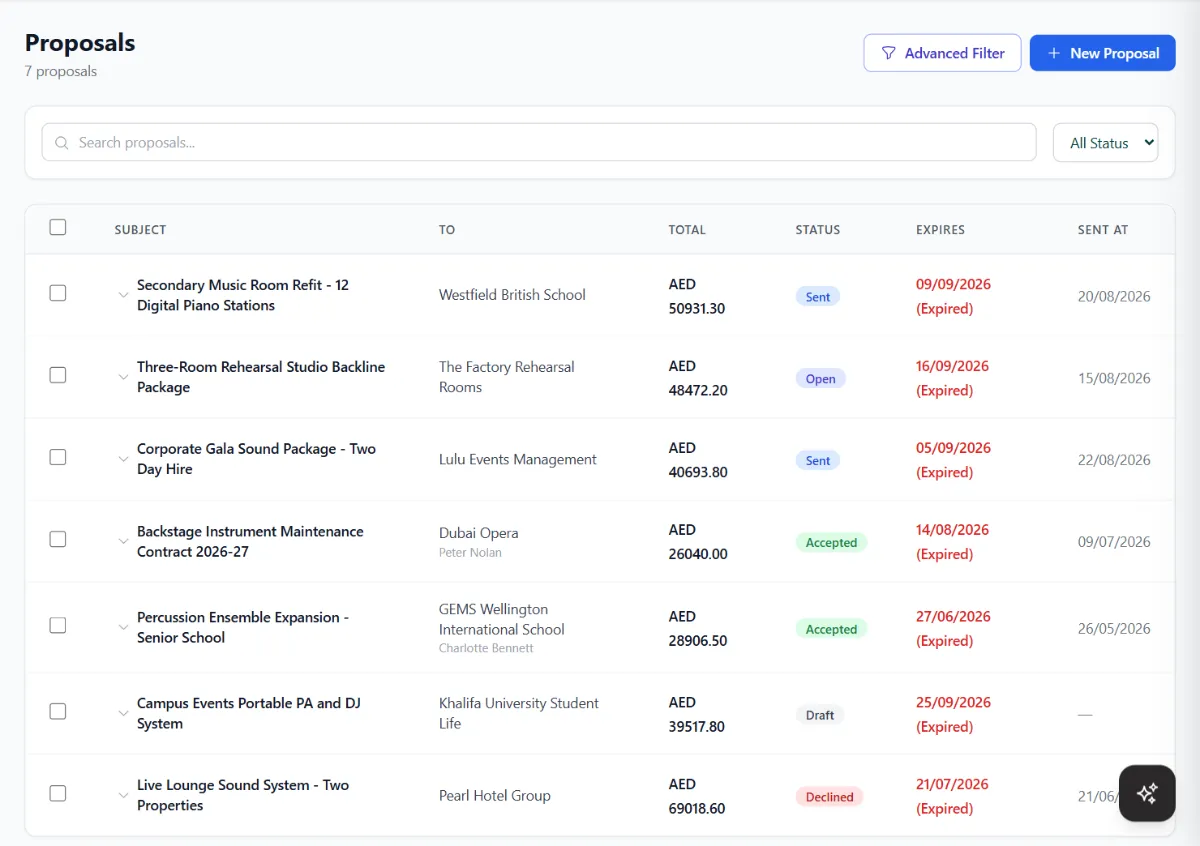
Quotes with line items from your catalogue, discounts and tax. Clients accept and sign online, or decline, and an accepted proposal becomes an invoice.
Lead10 Invoicing & Billing
Turn a signed quote into a tax invoice with your TRN, let clients pay by card from a link, bill subscriptions every month, and correct issued invoices with credit notes. Your VAT 201 figures are ready when the quarter ends, and Lead10 is UAE e-invoicing compatible.
Example invoice. Names and TRNs are made up.
At a glance
Lead10 Invoicing is the billing side of Lead10, the CRM and team inbox for WhatsApp, Instagram, Messenger and email. Sales teams use it to send quotes, raise tax invoices, collect payments and bill subscriptions from the same place they talk to customers, so every invoice is tied to the client, the lead and the conversation it came from.
Facts on this page were checked against Lead10 in November 2026. What you see also depends on your plan and your role.
The Billing menu
Open Billing in Lead10 and every money document is one click away. Expenses and reports sit right beside it, so the whole picture of what you sold, what you are owed and what you spent is in the same app as your leads.
Quotes with line items from your catalogue, discounts and tax. Clients accept and sign online, or decline, and an accepted proposal becomes an invoice.
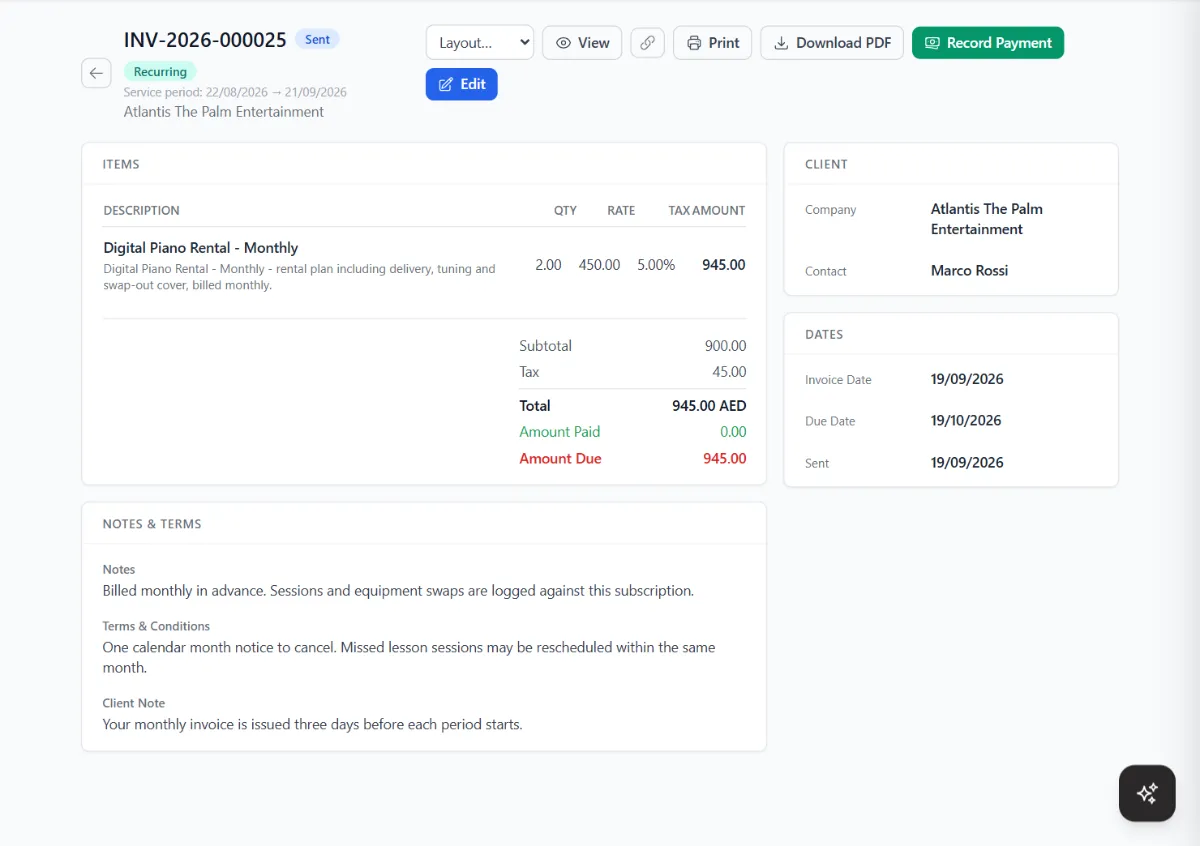
Tax invoices with a PDF and a public link. Record payments, take cards online and print a receipt for every payment.
Take back all or part of an issued invoice, with a reason. Apply the credit to other invoices or refund it.
Monthly or yearly billing that raises each invoice in advance, reminds clients before renewal and chases what is unpaid.
Ready-made plans with their price, cycle and setup fee, so starting a client's subscription takes seconds.
Your price list with tax rates, used on proposals, invoices and subscriptions. Import and export it as CSV or Excel.
What you spend, with its VAT treatment, so recoverable VAT reaches your VAT return.
Invoice aging, payments, sales, profit and loss, customer balances, VAT 201 and more, with CSV export.
Quote to cash
The customer asks for a price on WhatsApp. Everything after that happens in Lead10, without copying details from one system to another.
Invoices
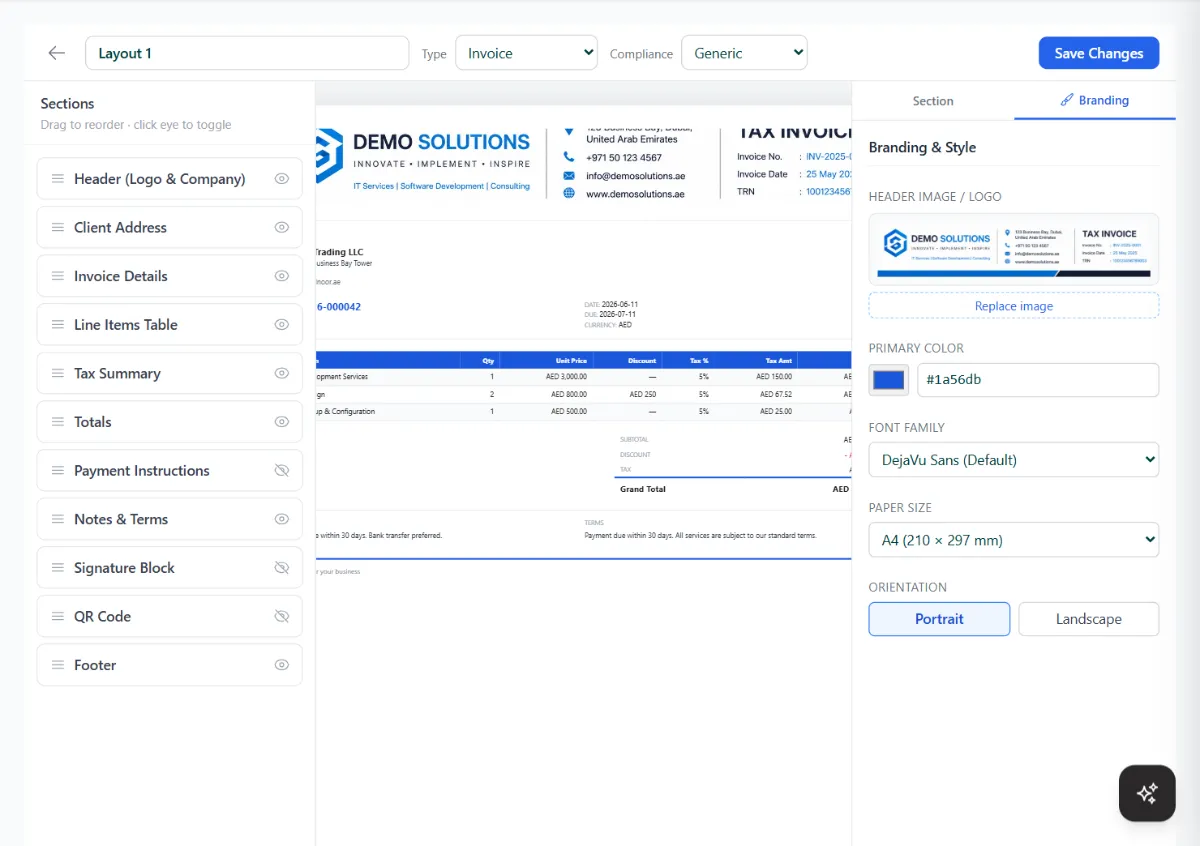
Design your invoice, proposal and receipt layouts once, by dragging sections into place. Pick the UAE VAT (FTA) layout and your invoices print as tax invoices, with your TRN, the total before VAT, the VAT amount and the total including VAT.
UAE e-invoicing
UAE e-invoicing replaces PDF and paper invoices with structured electronic invoices. Each one is created in the UAE data standard (PINT AE), sent by the supplier's accredited service provider (ASP) over the Peppol network to the buyer's ASP, and its tax data is reported to the Federal Tax Authority. Lead10 is UAE e-invoicing compatible: its e-invoicing API is already integrated with an accredited service provider, so there is nothing for you to connect.
As announced by the UAE Ministry of Finance and the Federal Tax Authority. Check mof.gov.ae/einvoicing for updates.
Invoicing from another ERP, POS or your own software? Use the same e-invoicing API that Lead10 runs on. Send invoices as JSON, and we convert them to PINT AE, validate them, submit them through our accredited service provider and return the status.
See the e-invoicing API or book a call with our team.
Credit & debit notes
A client returns part of an order, or you undercharged. Instead of editing an invoice you have already sent, raise a credit note or a debit note against it. Lead10 keeps the original, the correction and the balance in step.
Applied to
UAE VAT return
The VAT return report is laid out like the FTA's VAT 201 form. Pick the tax period and Lead10 adds up your issued invoices, debit notes, credit notes and approved expenses into the boxes you fill in on the return.
The report helps you prepare your return; you file it with the FTA yourself or through your accountant. Tourist refunds, import adjustments and bad-debt relief are not calculated.
| Box | Description | Amount | VAT |
|---|---|---|---|
| 1b | Standard rated, Dubai | 184,200.00 | 9,210.00 |
| 4 | Zero rated | 12,500.00 | 0.00 |
| 5 | Exempt | 3,000.00 | 0.00 |
| 3 | Reverse charge | 8,400.00 | 420.00 |
| 9 | Standard rated expenses | 41,600.00 | 2,080.00 |
| 10 | Reverse charge, recoverable | 8,400.00 | 420.00 |
| 14 | Net VAT due | 7,130.00 |
Recurring billing
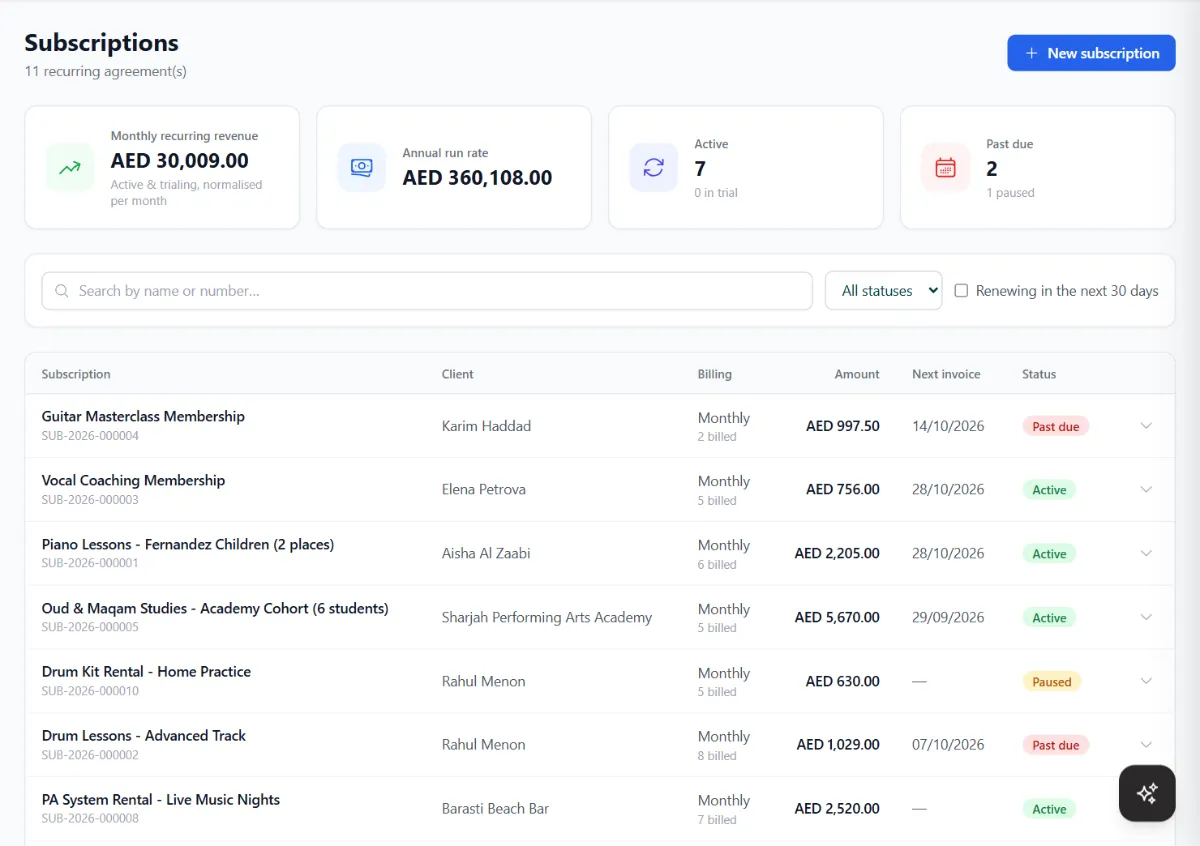
Retainers, rentals, memberships and maintenance contracts. Set the plan once and Lead10 raises every invoice, reminds the client and follows up when a payment is late.
Reports
Thirteen invoice and payment reports, filtered by date range and by who created the invoice, with CSV export. The four that matter most are also in the Lead10 Android app.
Example Figures are made up.
Part of your CRM
Because invoicing lives inside Lead10, the rest of your team's work feeds it, and it feeds the rest.
Open a client's invoices and proposals from their conversation in Smart Chat, and paste an invoice link into the reply.
Ask it to create an invoice and email it to the client. It only does what your role allows.
Send a WhatsApp or email campaign to a saved filter of invoices, for example everything overdue.
Invoices due, payments, subscription renewals and quote expiry dates appear as calendar layers.
The Android app shows invoices due today and reports on sales, profit and money owed.
Bring in clients, products and invoices from CSV or Excel, and export them again whenever you need.
Questions
Yes. Lead10 is UAE e-invoicing compatible. E-invoices are created in the UAE PINT AE format, validated, and sent through our accredited service provider (ASP) over the Peppol network, and the tax data is reported to the FTA. The status comes back to the invoice in Lead10.
For businesses with annual revenue of AED 50 million or more, from 1 January 2027. Businesses below AED 50 million must appoint an accredited service provider by 31 March 2027 and go live by 1 July 2027, as announced by the Ministry of Finance and the Federal Tax Authority.
No. Lead10's e-invoicing API is already integrated with an accredited service provider (ASP), so you can send UAE e-invoices from Lead10 without extra software or integration work on your side.
Yes. The same API that Lead10 runs on connects any ERP, POS, billing or custom software to UAE e-invoicing. Send invoices as JSON, and they are converted to PINT AE, validated, submitted through our accredited service provider, and the status is returned.
Yes. E-invoices your suppliers send you are received too, so purchase invoices arrive as data instead of PDFs.
Yes. Choose the UAE VAT (FTA) layout in the invoice layout builder and your invoices print as tax invoices with your TRN, total before VAT, VAT amount and total including VAT. You can add your logo, a QR code and a signature block.
Lead10 has a VAT return (VAT 201) report laid out box by box like the FTA form: sales by emirate, zero-rated and exempt sales, reverse charge, imports, recoverable VAT on expenses and net VAT due. You use it to fill in your return; it is not filed from Lead10.
Raise a credit note or a debit note against it, with a reason. An issued invoice is never edited or deleted, which is how e-invoicing expects corrections to work. To cancel an invoice, Lead10 raises a credit note for the whole amount.
Apply its balance to one or more of the client's invoices, take it off an invoice again, or refund it to the client. The customer balances report shows what each client owes after unused credit.
Yes. Every invoice has a public link with a PDF, and on plans with online payments, clients pay it by card. You can also send payment links, or record a payment yourself when a client pays another way. Each payment has its own receipt.
Yes. Subscriptions raise each invoice in advance, send it or keep it as a draft, remind clients before renewal, and chase, mark past due or cancel unpaid renewals by your rules. Card payments can be collected automatically. Recurring billing depends on your plan.
Invoice aging, payments collected, sales by customer, sales summary, items, gross profit, total income, expenses, profit and loss, payment method, credit notes, customer balances and the VAT return (VAT 201). Most can be exported to CSV.
Invoices are emailed from Lead10, and each has a public link you can paste into a WhatsApp chat. A client's invoices and proposals open right from their chat, and a bulk WhatsApp campaign can go to a saved filter of invoices, for example everything overdue.
Ready when you are
Sign up, add your products and TRN, and send a tax invoice today. Invoices, quotes and payments are on every plan.