

Home screen
New leads, chats waiting for your reply and tasks due, the moment you open the app, with today's follow-ups underneath.
Lead10 mobile app · Android
Answer WhatsApp, Instagram, Messenger and email from one inbox, move a lead forward in one tap, and see today's follow-ups the moment you open the app. It is the same Lead10 your team uses on the web, so the phone and the office always see the same chats and leads.
Free to download. Sign in with your Lead10 workspace code, email and password.
Can I book a trial lesson this week?
At a glance
Lead10: CRM & Lead Management is the Android app for Lead10, the CRM and team inbox for WhatsApp, Instagram, Messenger and email. Sales and support teams use it to answer customers, update leads and keep up with follow-ups from their phone. It signs in to your company's Lead10 workspace, so every chat, lead and note is the same in the app and on the web.
Facts on this page were checked against the app in September 2026.
Unified inbox
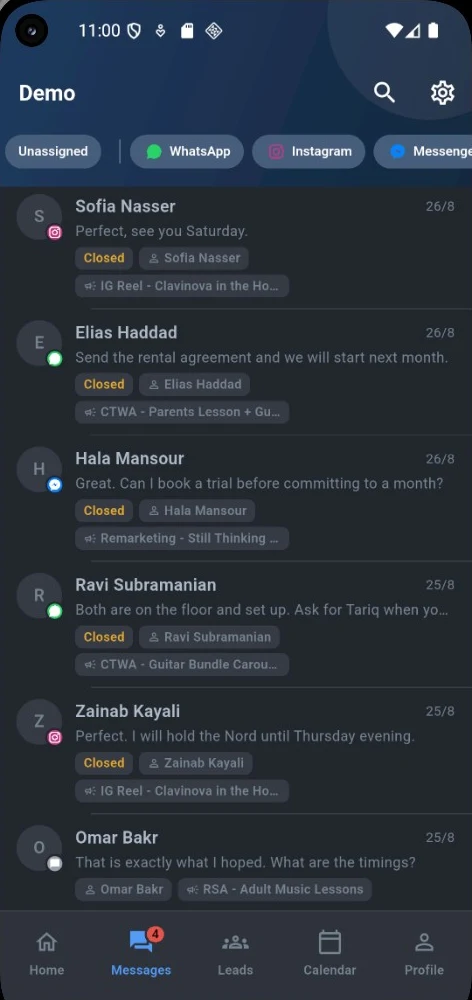
WhatsApp, Instagram, Messenger and email chats arrive in one list and update live. Each chat shows its channel, who it is assigned to, and the ad or campaign that started it, so you know what the customer saw before they wrote.
Conversations
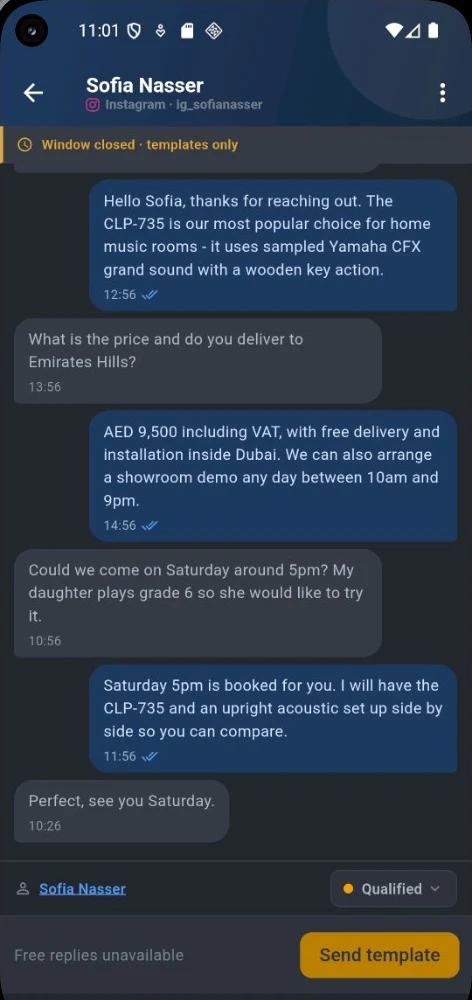
Type a reply, or send a photo, video, document, voice message or your location. Your team's saved answers are a few taps away, and you can change the lead's status without leaving the chat.
After a customer's last message, you can reply freely for 24 hours. After that, WhatsApp only accepts a template that Meta has approved. The app shows when a chat's window has closed and offers your approved templates, so a late reply is still one tap away.
Lead tracking
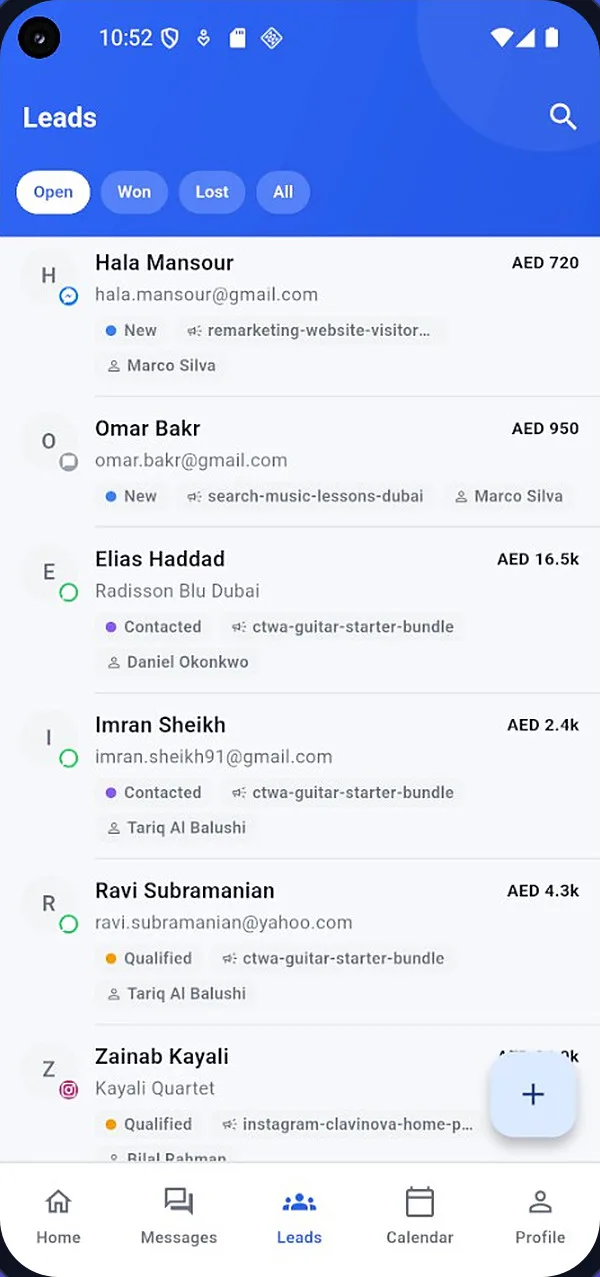
The Leads tab lists your open, won and lost leads with their deal value, status and salesperson. Every lead keeps its source: the channel, the campaign and the ad that brought it in.
Pipeline
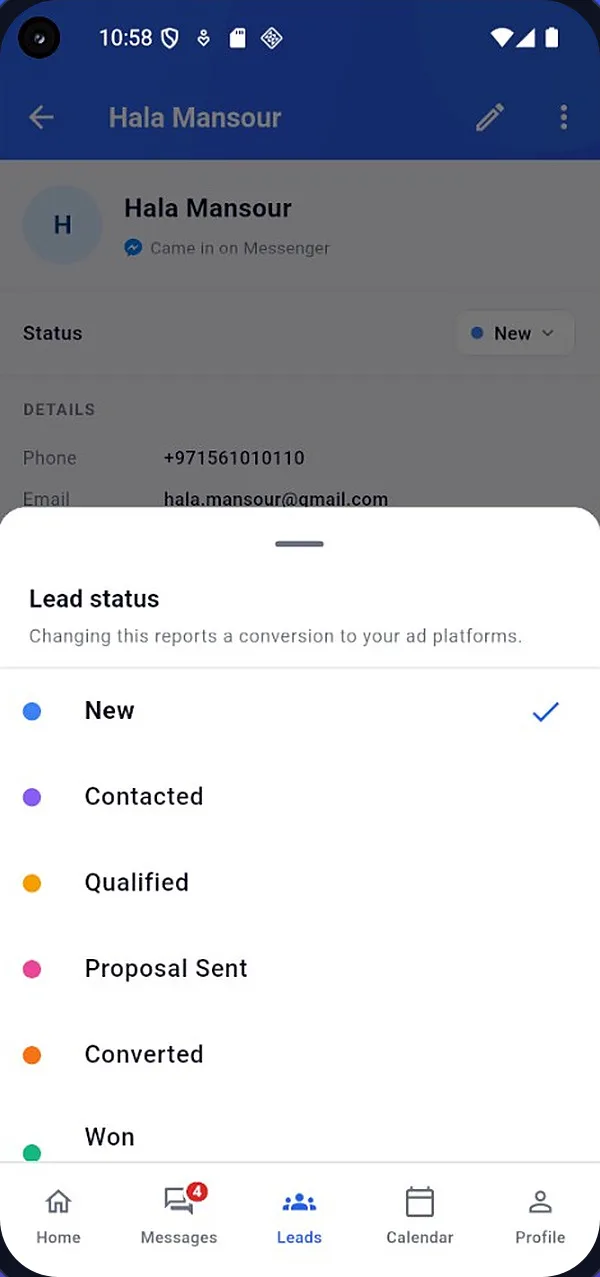
Tap the status and pick the new one from your own list. When that status is linked to a conversion in Lead10's Ads Manager, the change is sent back to Google Ads and Meta, so they can find more people like your real buyers.
Everything else
Beyond chats and leads, the app carries the parts of Lead10 you need away from your desk. Open them from the Quick Access grid on the home screen.
New leads, chats waiting for your reply and tasks due, the moment you open the app, with today's follow-ups underneath.
Follow-ups, tasks and events in one calendar. Plan meetings and site visits from your phone.
Create tasks with checklists and comments, and tick them off as you go.
Every client and contact with their notes, files and history. Add new ones on the spot.
Open a ticket for a customer, reply to it and update its status.
Record an expense when you pay it, then attach the receipt to it.
Sales summary, sales by customer, profit and loss, and money owed, by how late each invoice is.
How each Google Ads and Meta campaign is doing: spend, clicks, conversions, cost per acquisition and ROAS.
A light theme, a dim theme that is easy on the eyes at night, or follow your phone's setting.
App or web
The app is built for the work you do many times a day. Setting things up, building campaigns and billing stay on the web, where a bigger screen helps. Both work on the same data, so anything you change in one shows in the other.
| What you want to do | Lead10 app | Lead10 on the web |
|---|---|---|
| Answer WhatsApp, Instagram, Messenger and email | Yes | Yes |
| Send approved WhatsApp templates | Yes | YesAlso write them and submit them to Meta |
| Assign chats and change their status | Yes | Yes |
| Add leads, change status, convert or mark lost | Yes | YesAlso the Kanban board, import and export |
| Calendar, tasks, clients, contacts, tickets and expenses | Yes | Yes |
| Google Ads and Meta campaigns | ResultsSpend, clicks, conversions, CPA and ROAS | EverythingCreate campaigns, automation rules and audiences |
| Sales reports | Four key reportsSales summary, by customer, profit and loss, money owed | All reportsWith CSV export |
| Connect your WhatsApp number, Instagram, Messenger and email | On the web | Yes |
| Bulk WhatsApp and email campaigns | On the web | YesAbout campaigns |
| Quotes, invoices and payments | On the web | Yes |
| Users, roles and settings | On the web | Yes |
Built for teams
The app follows the same roles and permissions as Lead10 on the web. Set them up once, and they apply on every phone in the team.
A masked number looks like 97156xxxx31.
Getting started
If your company already uses Lead10, you can be answering chats on your phone in about a minute.
Start a free trial on the web, connect your WhatsApp number and your other channels, add your team, and then install the app.
Questions
Yes. The app is free to download from Google Play. To sign in, you need a user in a Lead10 workspace, on any Lead10 plan.
Yes. The app is for teams that use Lead10. Your workspace administrator adds you as a user, and you sign in with the workspace code, your email and your password.
WhatsApp, Instagram, Messenger and email, all in one inbox. WhatsApp connects through Meta's official WhatsApp Business Platform.
Yes, with a template that Meta has approved. The app shows when a chat's 24-hour window has closed and offers your approved templates to send instead.
Yes. The app sends a push notification when a customer writes to you, and tapping it opens that chat.
Yes. You can send photos, videos, documents, voice messages and your location, wherever the channel accepts them. Instagram does not accept documents or locations, Messenger does not accept documents, and email does not accept voice, video or locations.
Yes, once conversions are set up in Lead10's Ads Manager. A status linked to a conversion is reported back to Google Ads and Meta, the same as when you change it on the web.
Only if their role allows it. Otherwise staff see the chats assigned to them, and tabs they have no access to are hidden. Phone numbers and emails can also be masked for staff without permission.
Not yet. Quotes, invoices, bulk campaigns and ad campaign building are on the web. In the app you can check sales reports, money owed and how each ad campaign is doing.
Yes. Choose a light theme, a dim theme, or follow your phone's setting.
Use the account deletion page at lead10.com/delete-account. It explains how to delete your account and data from both the app and the web.
Ready when you are
Install the Lead10 app, sign in with your workspace code, and never miss a lead again when you are away from your desk.